

This still feels like an uncharted territory for network monitoring platforms, and we believe the possibilities are enormous. We are eager to explore this new functionality together with our community. After the release, we invite you to share your experiences, use cases, and ideas on our forum for how AI can make network management smarter and more efficient. Your feedback will shape how this technology evolves in future releases.
In this article, we will give you a first look at the AI capabilities coming in NetXMS 6: the AI Assistant for interactive queries and analysis, and the AI Agent for autonomous, scheduled operations.
Introducing the AI Assistant
The AI Assistant in NetXMS 6 provides a conversational interface for interacting with your monitoring system. Accessible through a new chat view in the management console, the assistant allows you to ask questions, request analysis, and even configure monitoring elements using natural language.
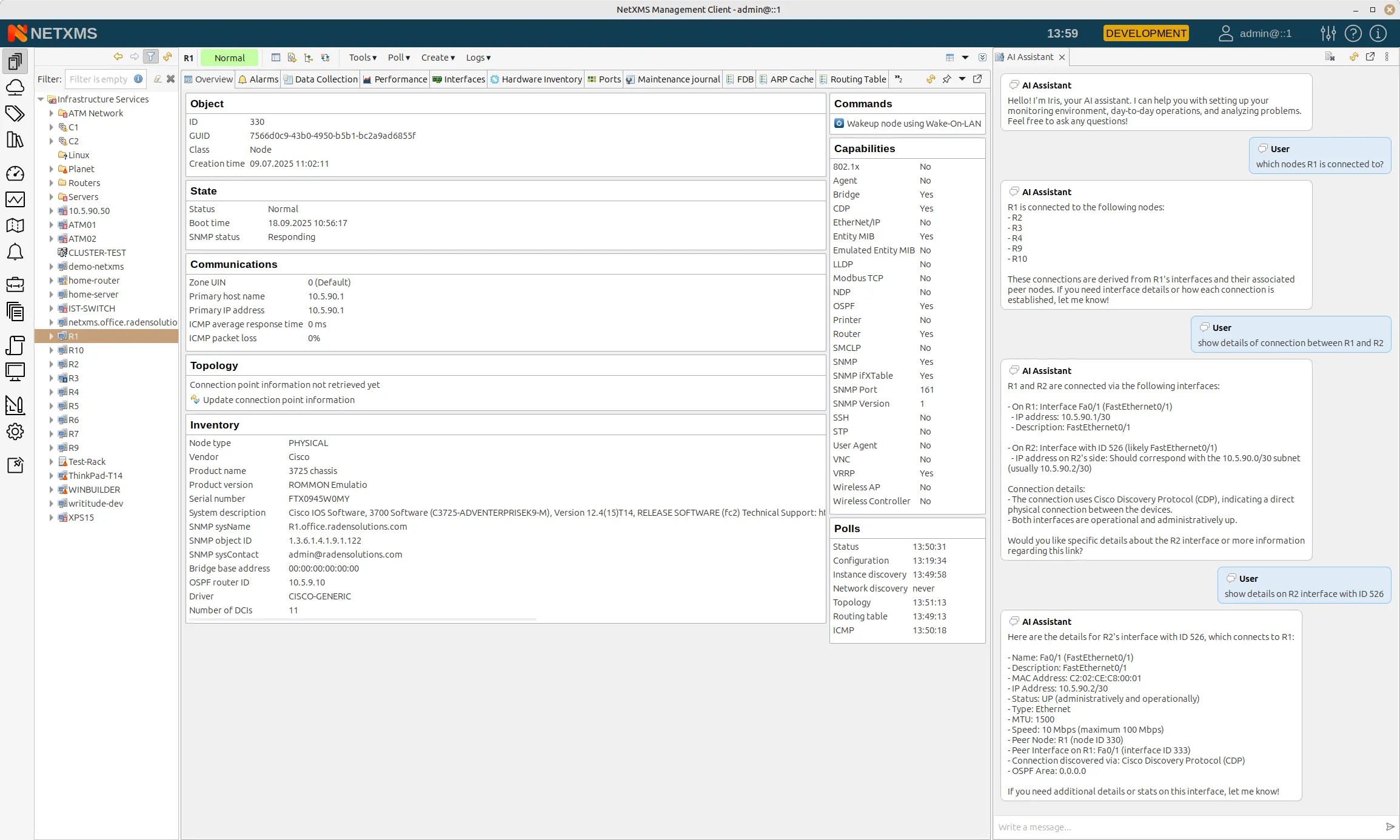
The chat view is flexible — you can dock it on the side of your interface, keep it floating, or place it wherever works best for your workflow. This is not a separate application; it is deeply integrated with NetXMS, giving the assistant direct access to your objects, metrics, alarms, and topology data.
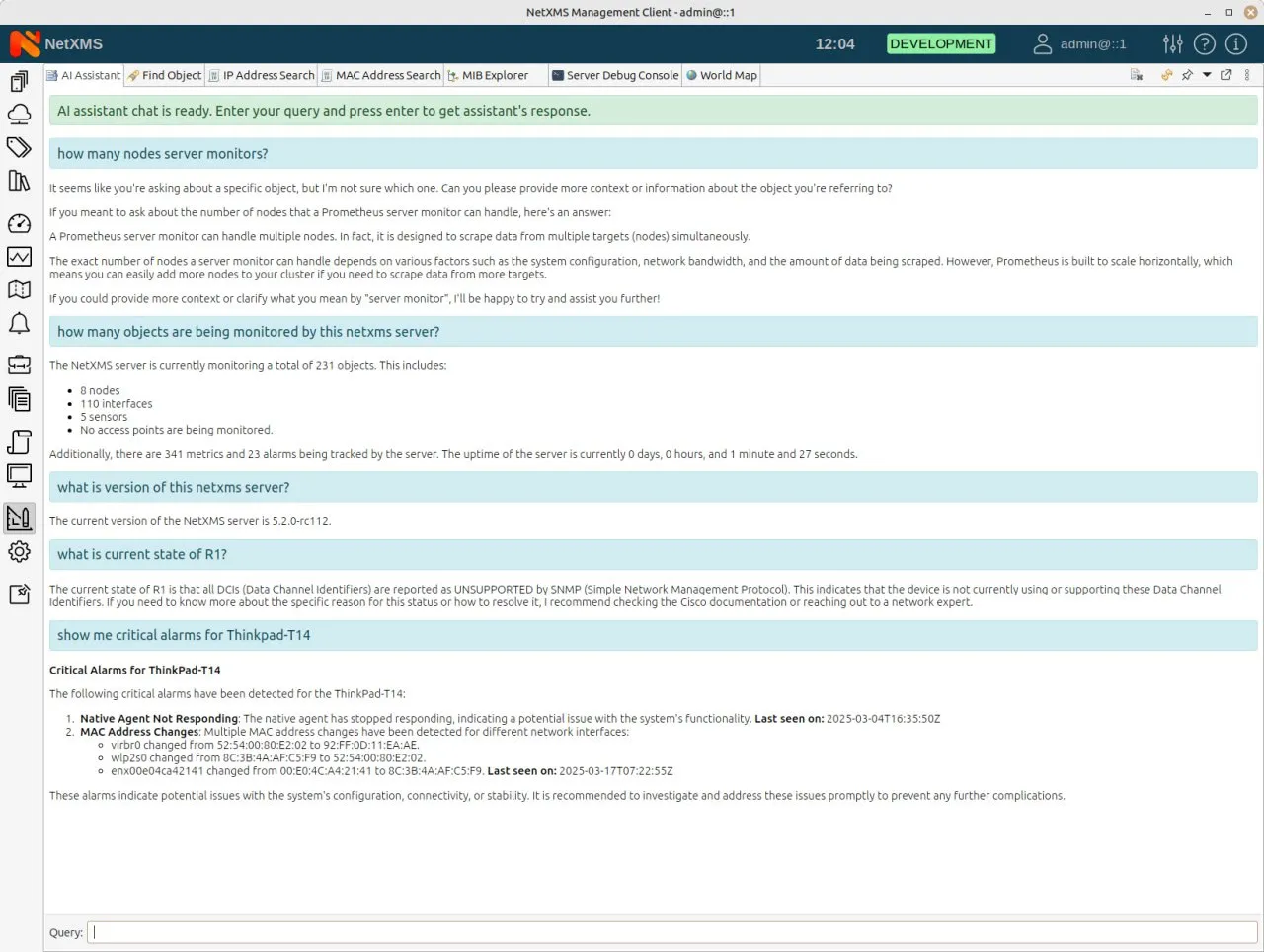
To power the assistant, NetXMS connects to an external LLM backend. You have the flexibility to choose your preferred provider: use a local model like Llama for complete data privacy, or connect to cloud services such as OpenAI. The model selection is configurable in the server settings, allowing you to balance performance, cost, and privacy according to your organization’s needs.
Key Capabilities
Help That is Always There
Need to understand your network topology? Simply ask. The assistant can retrieve and summarize how your devices are connected, explain discovery methods, and provide details about specific objects. For example, asking “How are my routers connected?” returns a summary of topology information known to NetXMS, including what devices are connected to a particular router and how they were discovered.
You can also ask about device characteristics. The assistant can identify device types, explain how classifications were determined, and provide context about the systems in your environment.
Guided Metric Configuration
One of the most practical applications of the assistant is helping you configure monitoring. Suppose you want to monitor CPU utilization on a Cisco router but are unsure which SNMP OID to use. You can ask the assistant for suggestions, and it will provide relevant options based on the device type.
Better yet, once you have identified the metric you want, you can ask the assistant to create the data collection item directly. For instance, you might say “Create a metric for CPU total 1 minute on Router1” and the assistant will configure the DCI for you. You can then extend this across your infrastructure by asking to replicate the metric on all similar devices.
Important note: As with any LLM-based system, the assistant may occasionally make mistakes. During our demonstrations, we observed cases where the assistant used incorrect parameters that required correction. Always verify configurations, especially for critical monitoring items. Think of the assistant as a knowledgeable colleague who can speed up your work but whose suggestions should be double-checked.
System-Wide Analysis
Perhaps one of the most useful features is the ability to request system-wide analysis. Ask the assistant to “analyze current alarms” and you will receive a detailed breakdown of what is happening across your infrastructure. The assistant categorizes issues by severity, highlights critical problems that need immediate attention, and provides context to help you prioritize your response.
This capability transforms how you can approach shift handoffs or management reporting. Instead of manually reviewing dozens of alarms, you can ask for a summary and even have it sent to your email directly from the conversation.
Historical Data Analysis
The assistant can analyze collected metrics over time and provide insights. For example, asking “Analyze CPU usage on the NetXMS server for the last 3 days” prompts the assistant to examine the historical data, identify patterns such as spikes or unusual averages, and draw conclusions about system health. It might report that everything looks normal with low average utilization, or flag specific time periods that warrant investigation.
The AI Agent: Autonomous Operations
While the AI Assistant responds to your direct queries, the AI Agent operates independently. The key difference is autonomy: you can create tasks for the agent, and it will execute them on schedule or in response to conditions, without requiring your ongoing interaction.
Creating Agent Tasks in NetXMS
Tasks can be created in two ways. The first is through conversation with the assistant. You might say: “Analyze current state of R1 in background and report via AI messages.” The agent confirms your intent, sets up the scheduled task, and begins monitoring. The second method is through a traditional GUI in Server Configuration, where a new AI Tasks section lets you create, view, and manage all agent tasks.
Each task includes a description, creator information, schedule, and an explanation field.
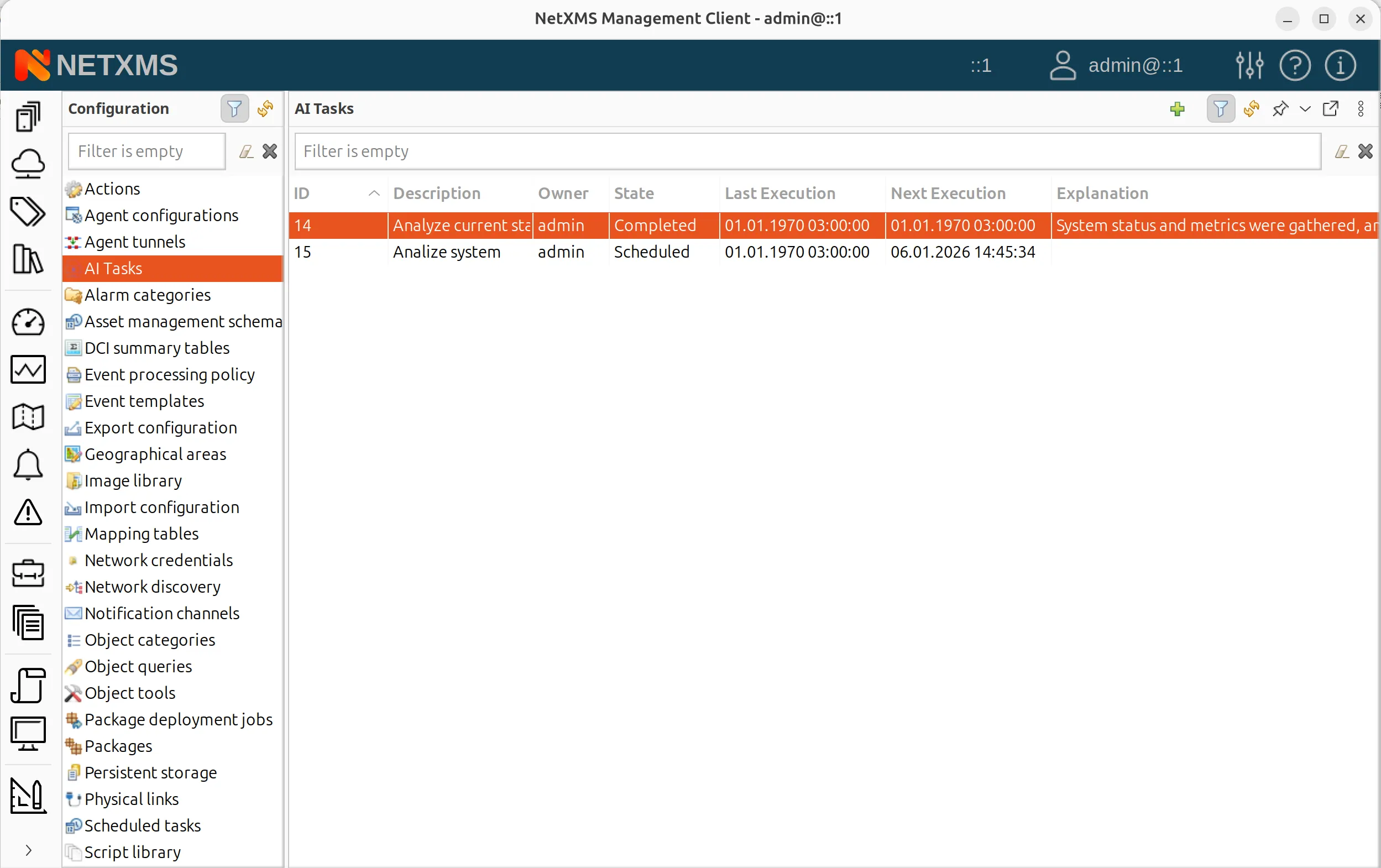
After each execution, the agent records what it found and what actions it took, creating an audit trail of its autonomous operations.
Taking Proactive Actions
The agent is not limited to sending notifications. It can take real actions within NetXMS. For example, you could instruct it: “Find all routers with high CPU usage and put them in maintenance mode.” The agent identifies matching devices based on current metrics and executes the maintenance mode command for each one.
This opens up powerful possibilities for automated incident response. Instead of waiting to be notified and then taking manual action, you can define policies that the agent executes autonomously, reducing response time and operator workload.
Practical Applications
AI-Powered Alarm Comments
For any alarm in the system, you can right-click and select “Ask AI Assistant.” The assistant analyzes the alarm context and provides thoughts on possible causes and remediation steps.
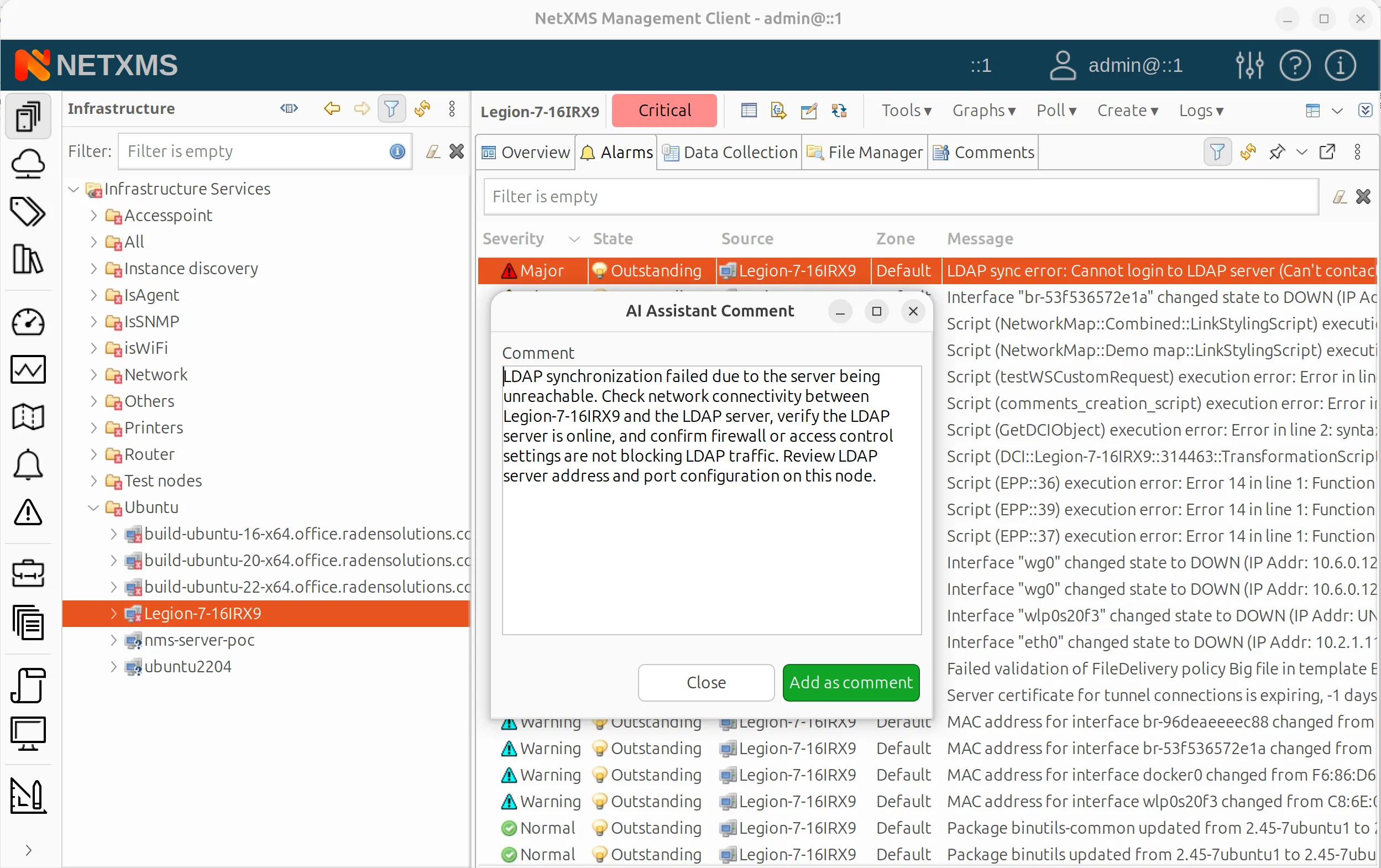
You can read this analysis or add it as a comment to the alarm, where it becomes part of the alarm history.
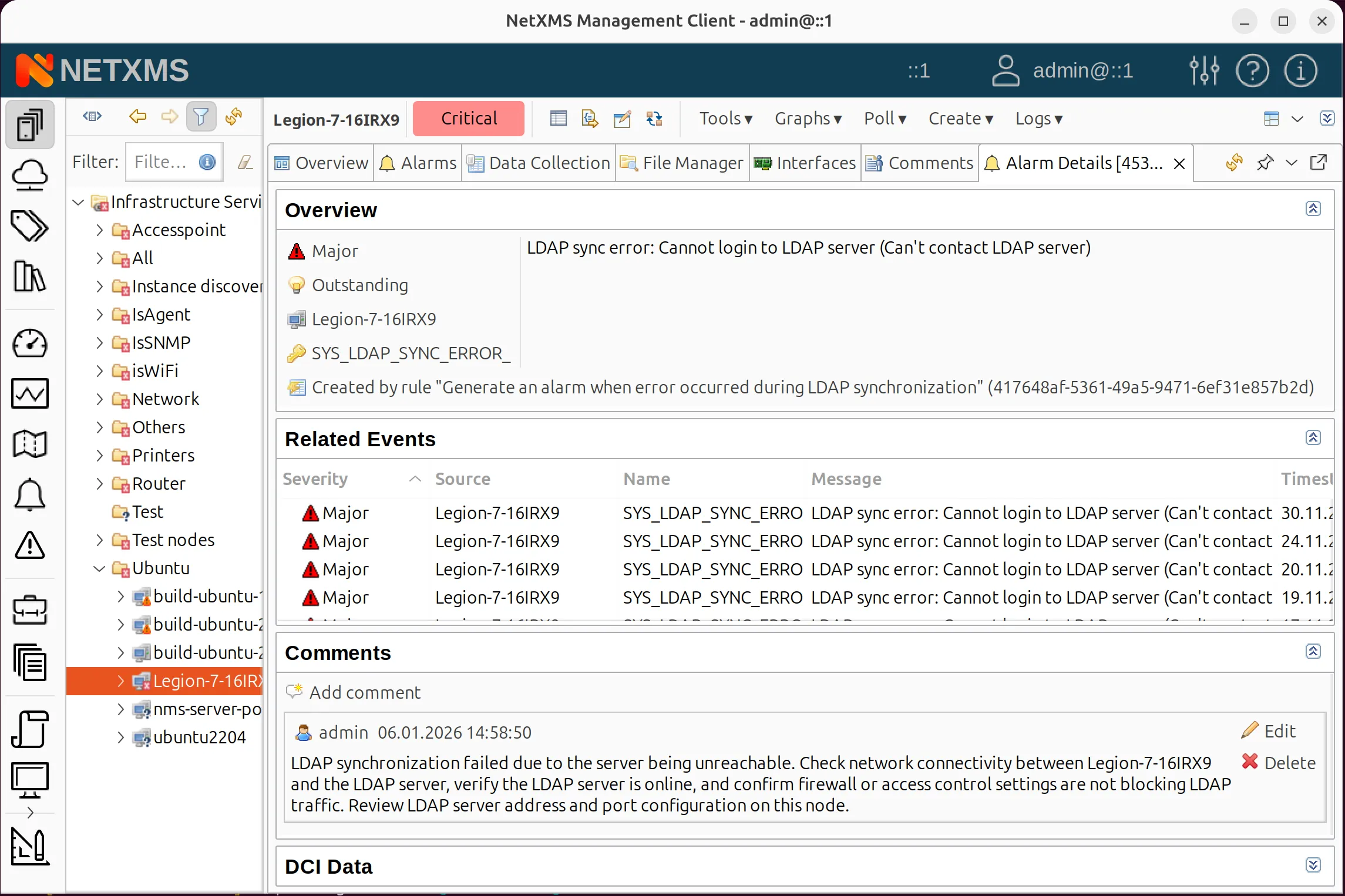
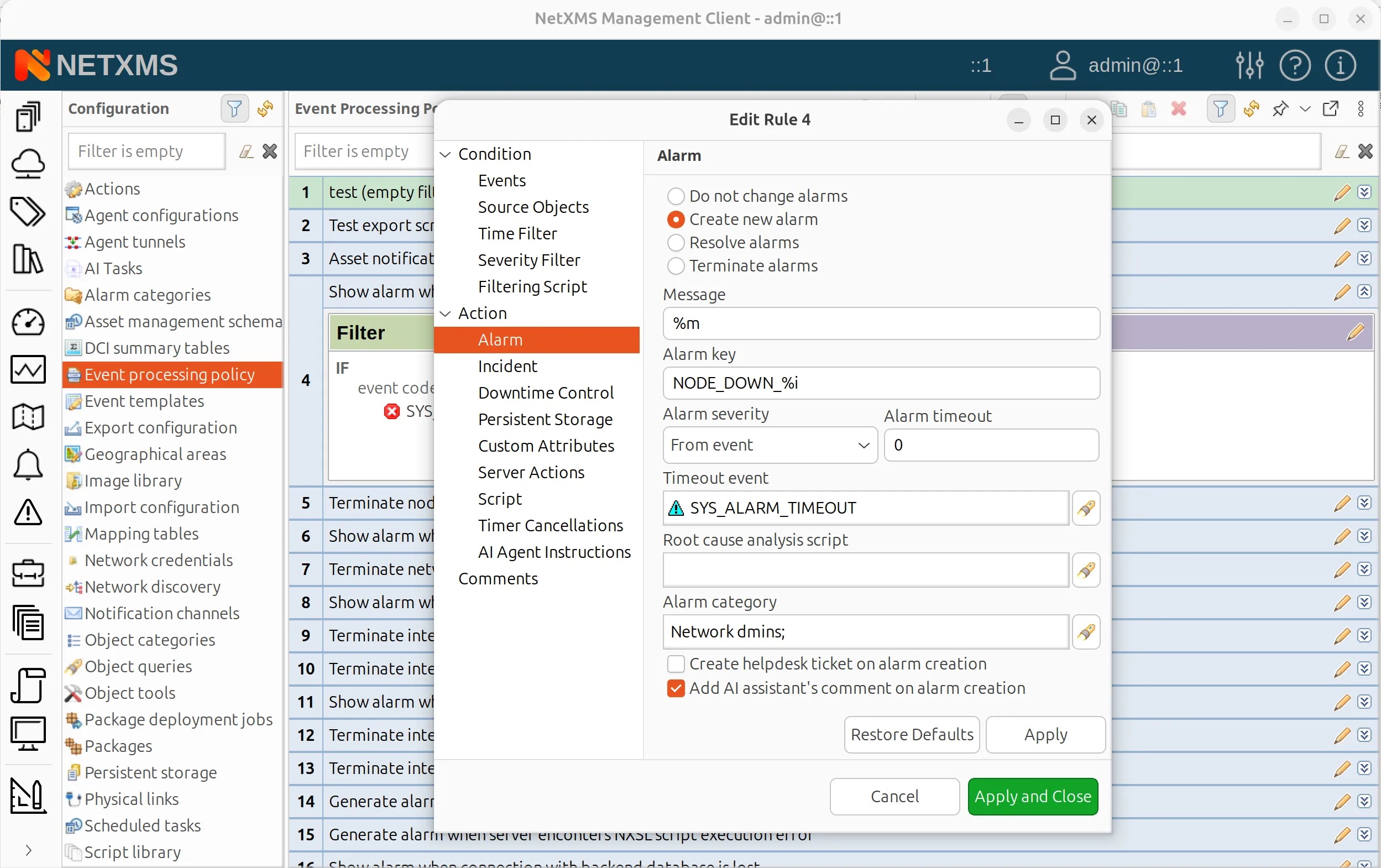
Even more useful: you can configure event processing policies to automatically attach AI comments when alarms are created. This means every new alarm arrives with initial analysis already attached, giving operators a head start on troubleshooting.
On-Demand Reports via Email
The assistant integrates with all configured notification channels. Ask it to analyze current alarms and send the summary to a specific email address, and it generates the report and delivers it using your existing notification infrastructure. This works with email, Telegram, Slack, or any other channel you have configured in NetXMS.
Extensibility Through Scripting
NetXMS has always been highly customizable through its NXSL scripting engine, and AI capabilities are fully integrated into this ecosystem. A new function, QueryAIAssistant, allows you to call the AI from any NXSL script, providing an object as context and receiving the assistant’s response.
You can also extend the assistant’s capabilities by creating custom tools in the script library. With just a few lines of NXSL, you can enable the assistant to perform actions it does not support out of the box. For example, a simple script can give the assistant the ability to create containers or perform other administrative tasks specific to your environment.
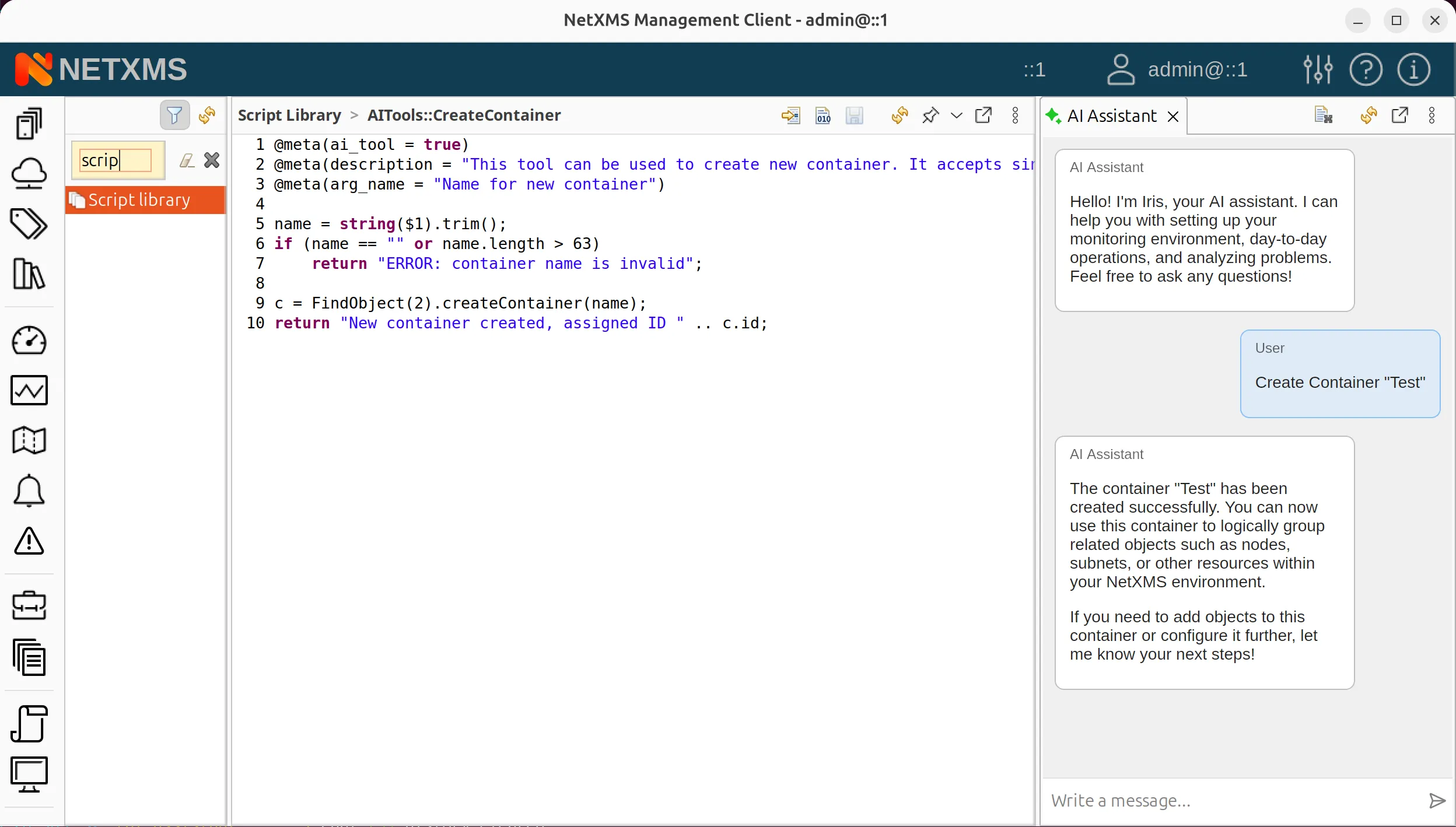
This extensibility means the AI features can grow with your needs and adapt to your specific workflows.
Looking Ahead
We want to be transparent. AI-powered functionality in NetXMS 6 is an early-stage feature. While we are excited about what it can already do, we recognize there is significant room for improvement. Internal prompts will be refined to help the system better understand user intent. Additional tools will be added to give the assistant access to more information. The user interface will be polished based on real-world usage.
Starting from NetXMS v6, MCP and AI assistant capabilities are provided in the open-source version. The AI agent module is available only as part of the NetXMS Enterprise Edition.
This is also why we need your input — LLM technology applied to network monitoring is relatively unexplored territory. We have ideas about how it can be useful, but we are certain our community will discover use cases we have not imagined! After you have had a chance to work with these features, please share your experiences on our forum or community support chat in Telegram. Tell us what works, what does not, and what you wish the AI could do.
To conclude, NetXMS 6 represents a significant step forward in intelligent network management. The AI Assistant brings natural language interaction to monitoring, making it easier to query your infrastructure, configure metrics, and analyze system health. The AI Agent enables autonomous operations, executing scheduled tasks and taking proactive actions without constant human oversight. We believe this is just the beginning of what AI can do for network operations. Expect continuous improvements throughout the version 6 release cycle as we refine the technology and expand its capabilities based on real-world feedback.
To learn more about NetXMS and stay updated on the version 6 release, visit netxms.com.