

NetXMS speaks OTLP both ways. It ingests OpenTelemetry metrics and logs from instrumented applications and collectors, and it exports its own events, metrics, and logs to any OTLP-compatible backend.
Metric ingestion arrived in NetXMS 6.1, while log ingestion landed in 6.2. Let’s walk through this important functionality step-up in the platform.
OpenTelemetry has become the lingua franca of modern observability, and the plan is for NetXMS to speak it natively, not just as a bridge.
Here’s how it works, what it takes to set up, and where it goes next.
Why metrics came first
NetXMS already speaks SNMP, native agents, MQTT, Modbus, OPC UA, and a long list of other protocols. OpenTelemetry adds something different: a vendor-neutral way to pull telemetry directly from instrumented applications and services. This is the layer above the infrastructure NetXMS has always monitored well.
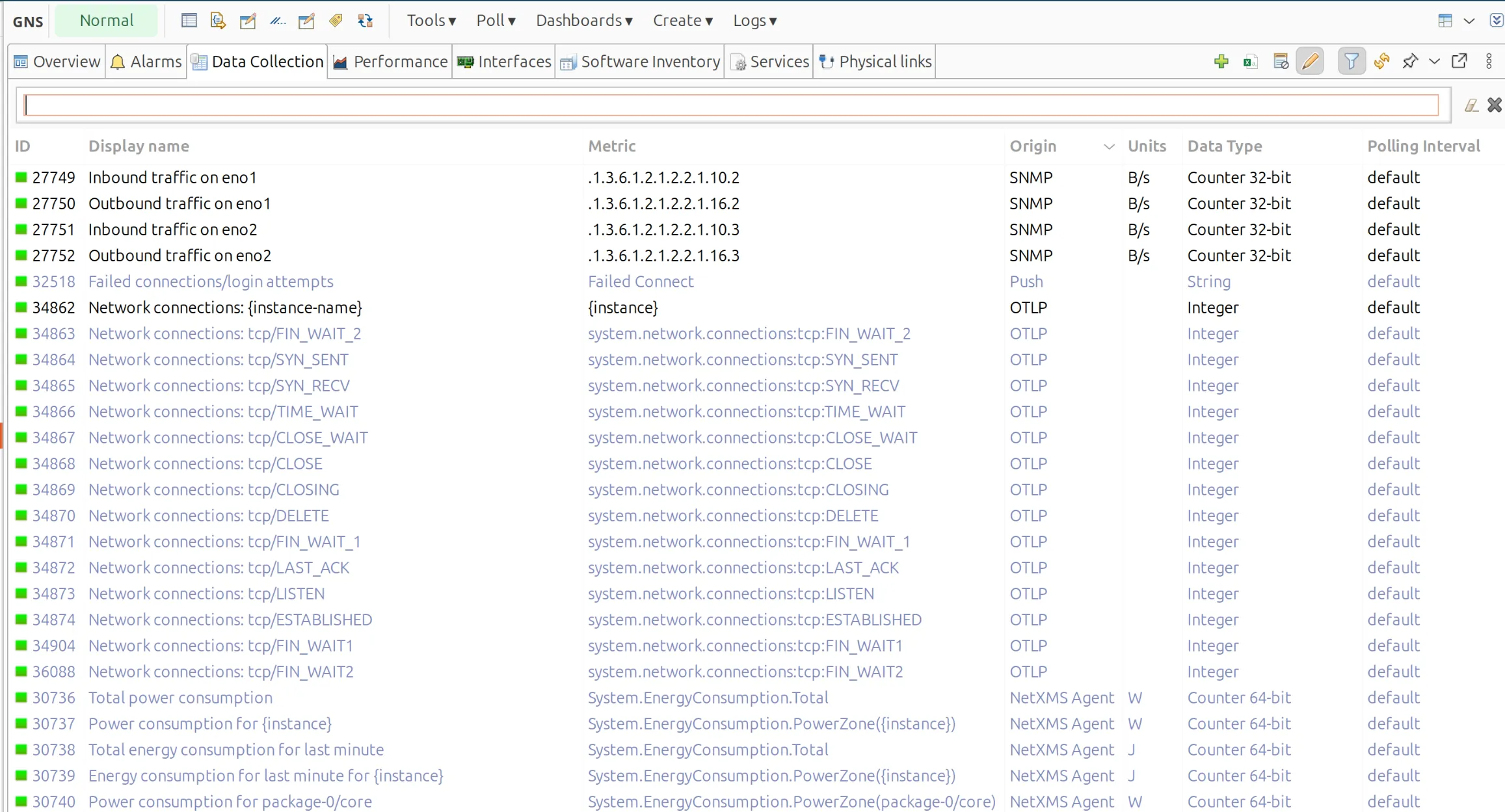
Metrics fit the existing model almost exactly. OTLP metrics arrive as a push stream, NetXMS already handles push metrics as a first-class concept, and the rest was plumbing. A new origin, a new endpoint, and a few smart additions to instance discovery.
Logs needed more work, because a log line isn’t a data point — it’s an event. Getting them right meant wiring OTLP into the event pipeline rather than the data collection engine.
How OTLP data flows into the server
To enable OTLP, you load the dedicated OTLP module on the server. The module rides on top of the NetXMS Web API, so a few prerequisites apply:
- The Web API core must be enabled and listening
- It needs to listen on an external interface, not just loopback — exporters have to reach it over the network
- The OTLP module registers its own endpoint at
/otlp-backend/v1/metrics, as well as/otlp-backend/v1/logs
You don’t need the full Web API module if you’re not using other web functionality. The OTLP module brings in only what it needs.
A note on the wire format: NetXMS currently accepts protobuf over HTTP (and since 6.2.3 the OTLP module also supports JSON over HTTP). Raw protobuf streams aren’t supported, so make sure your exporter is configured for the HTTP transport.
Authentication
Every push has to carry a valid NetXMS authorization token. The setup is straightforward:
- Create a dedicated OTLP user in NetXMS
- Open Authentication Tokens for that user
- Issue a new token with a clear description
- Drop the token into your exporter’s authorization header
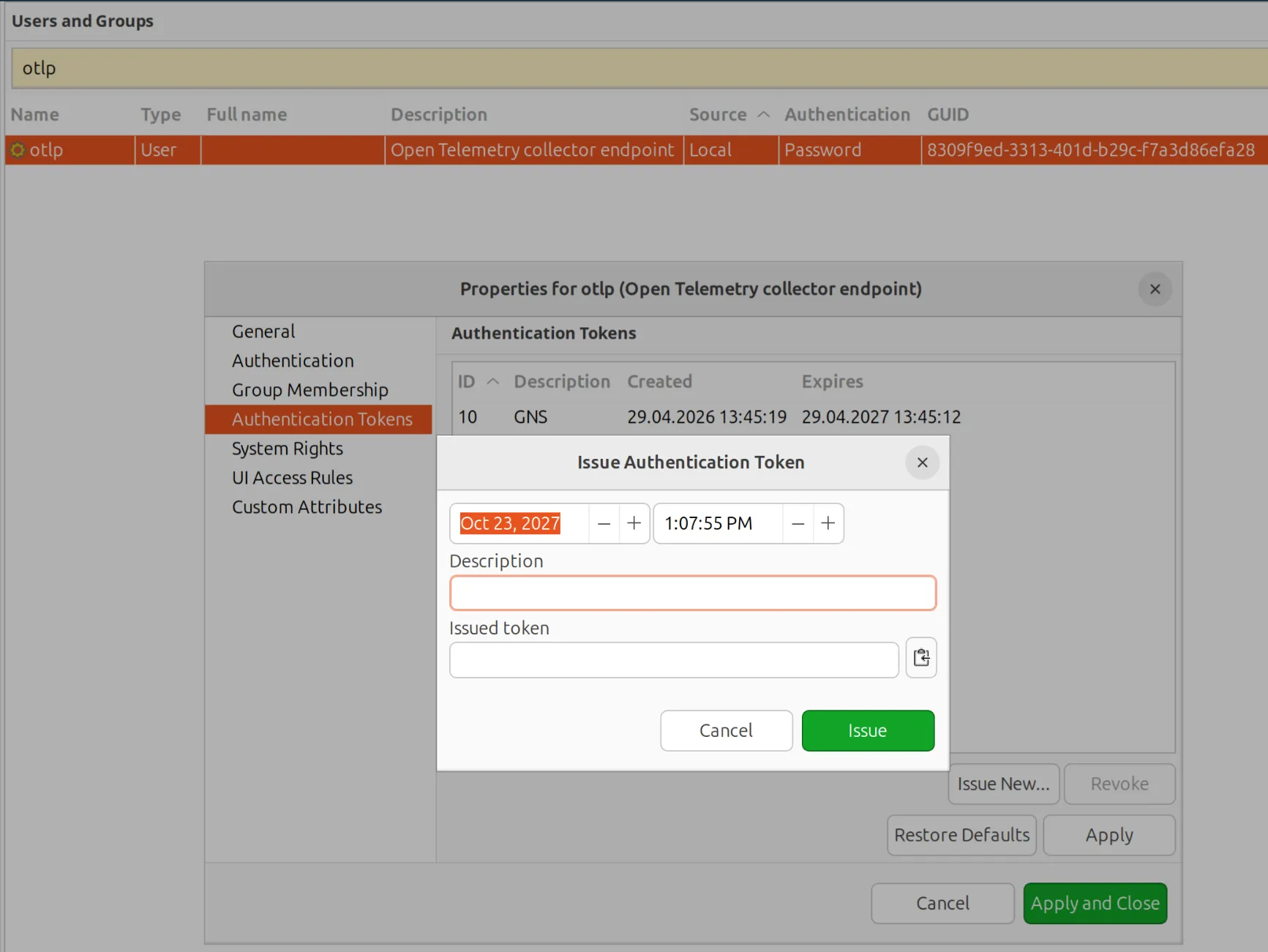
Using a dedicated user makes audit and revocation clean — if a collector goes rogue or gets decommissioned, you kill one token and you’re done.
Configuring the sender
On the OpenTelemetry Collector side, the relevant block is the exporter. The important fields:
- The endpoint URL pointing at your NetXMS server
- Protobuf or JSON encoding
- No compression
- Bearer authentication with the token you just issued
Most exporters automatically append /v1/metrics to the base URL. The NetXMS server expects the full path, so check what your exporter is sending if metrics aren’t landing.
extensions:
  bearertokenauth:
    token: "<NetXMS authentication token>"

exporters:
  otlphttp/netxms:
    metrics_endpoint: http://netxms.example.com:8000/otlp-backend/v1/metrics
    logs_endpoint: http://netxms.example.com:8000/otlp-backend/v1/logs
    encoding: proto
    compression: none
    auth:
      authenticator: bearertokenauth

service:
  extensions: [bearertokenauth]
  pipelines:
    metrics:
      receivers: [otlp]
      exporters: [otlphttp/netxms]
    logs:
      receivers: [otlp]
      exporters: [otlphttp/netxms]
How telemetry gets matched to nodes
Once data arrives, the server tries to match each incoming signal to a node using identifying attributes from the OTLP resource — host name, service name, IP, or whatever else the exporter is sending. The same matching rules apply to metrics and logs, so you configure this once.
For metrics, if a match is found, the server then looks for a DCI configured to receive that specific metric. If there’s no DCI, the metric is logged at debug level and dropped. This is intentional: NetXMS stays declarative about what it stores. You decide what’s worth keeping.
If you turn debug verbosity up, you’ll see plenty of “received but no DCI” messages in the server log. That’s normal, it’s how you discover what’s actually arriving so you can decide what to capture.
Creating a simple OTLP DCI
For a single-value metric (say, process memory) the workflow is the same as any other DCI:
- Create a new metric on the node
- Select OTLP as the origin
- Enter the metric name
- Set the data type
- Save
On the next push cycle, the value lands and starts charting like any other DCI.
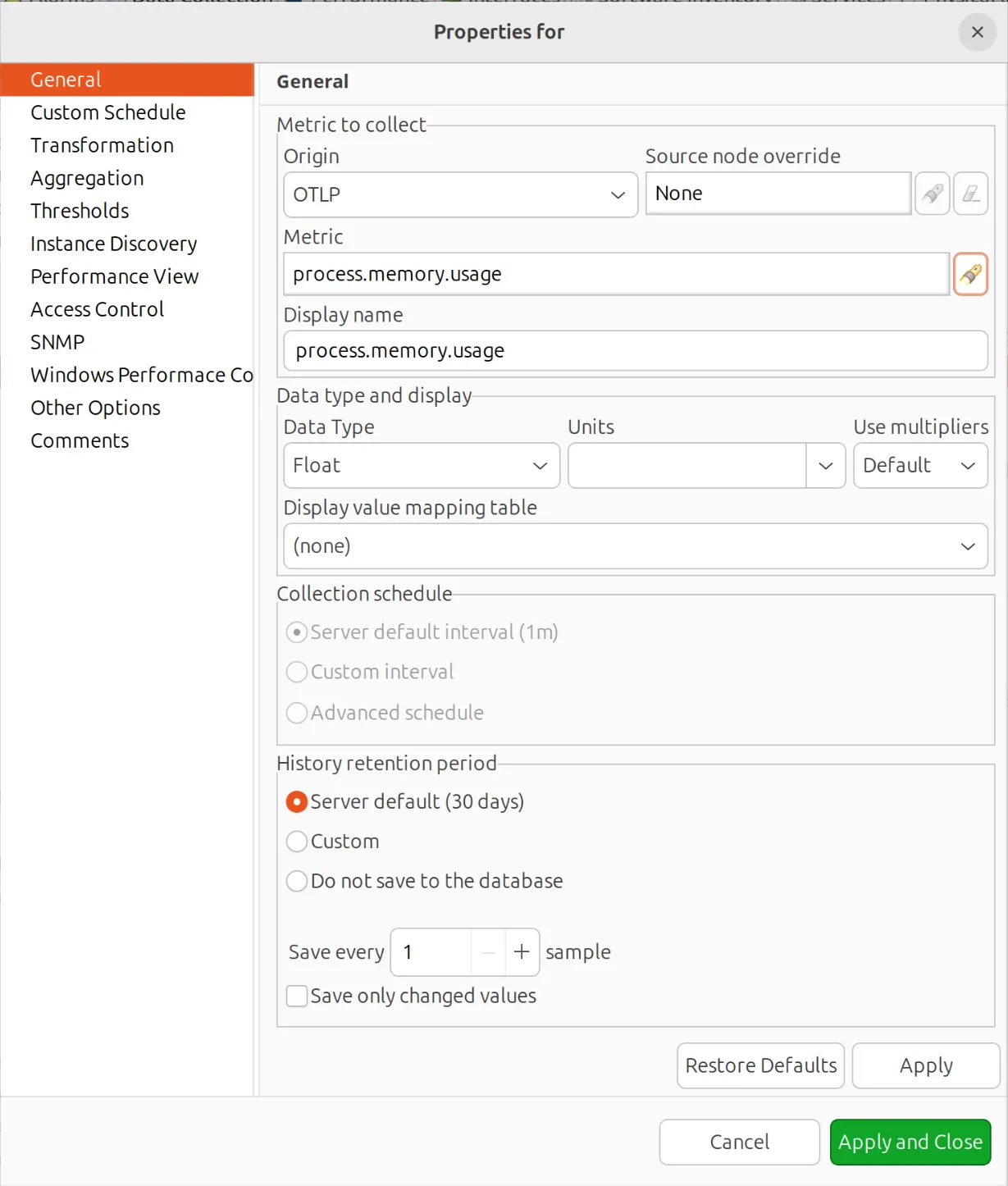
A small but deliberate design choice: OTLP gets its own origin rather than being lumped together with generic push. The semantics differ enough (different attribute model, authentication path, and different lifecycle) that mixing them would create ambiguity in alerting and history. Keeping them separate, though, keeps things clear.
Handling multi-attribute metrics with instance discovery
The realistic case isn’t single values. It’s one metric name fanning out across many attribute combinations — network.connections split by state, for example, with separate values for TCP_ESTABLISHED, TCP_LISTEN, and so on.
For that, NetXMS has OTLP-specific instance discovery. It works a bit differently from other instance discovery methods, but the building blocks are clear:
- Metric name — supports patterns, not just exact match. Useful when you want to capture a family of metrics in one configuration.
- Key attributes — every unique combination of these becomes a separate instance. This is what splits
network.connectionsinto one DCI per state. - Instance name format — optional. You can leave it empty and let the system generate names, or build your own template that references the key attributes for cleaner display.
Standard instance discovery filters still apply if you want to exclude specific instances. Same NXSL, same behaviour.
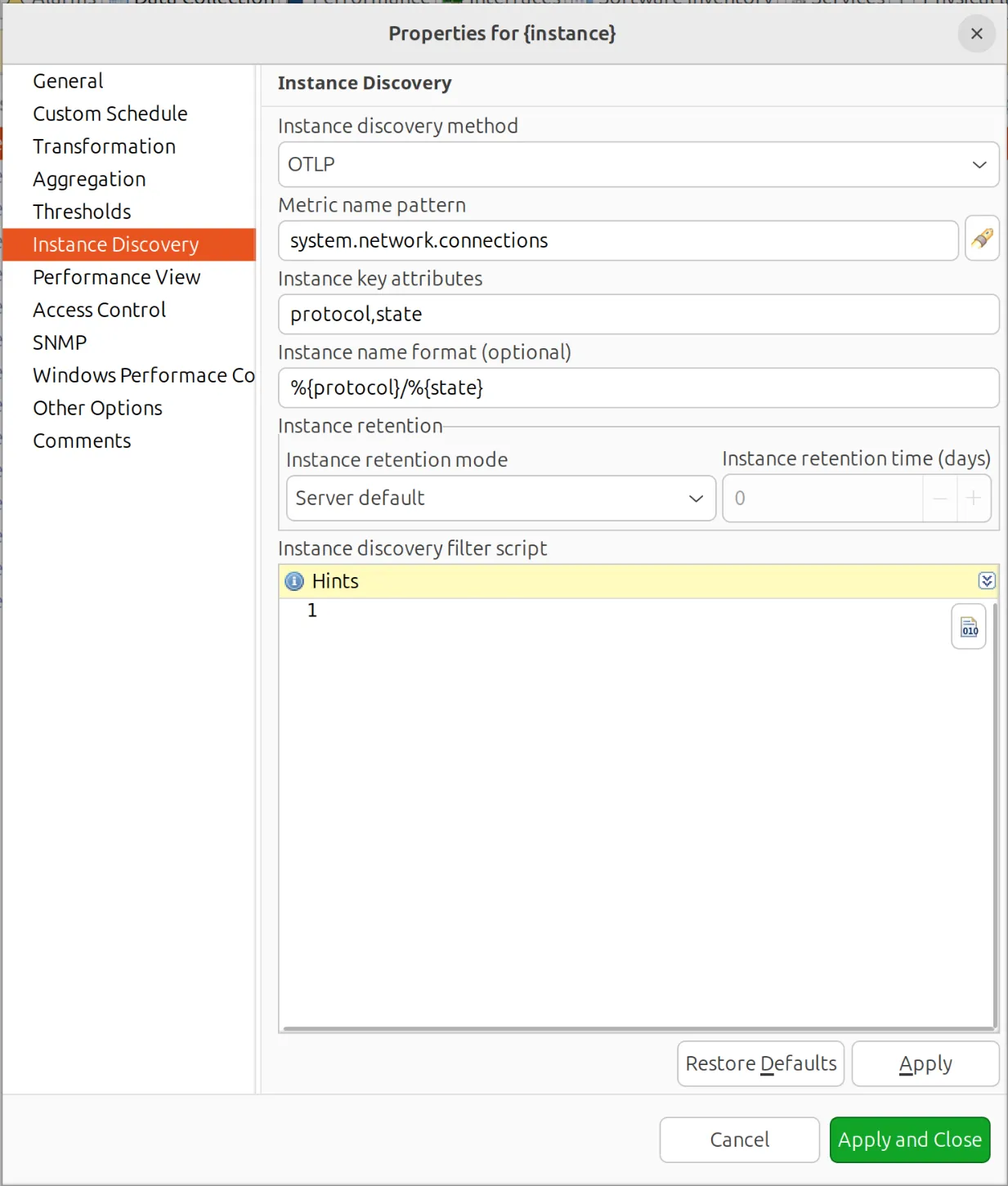
When a new instance arrives — a protocol you hadn’t seen before, a new container, whatever — the system creates the DCI on the fly. No manual setup per instance.
OTLP logs in 6.2
Log ingestion follows a different path through the server. Incoming OTLP log records are matched to nodes using the same resource attributes as metrics and stored in the node’s OpenTelemetry log, much like syslog messages.
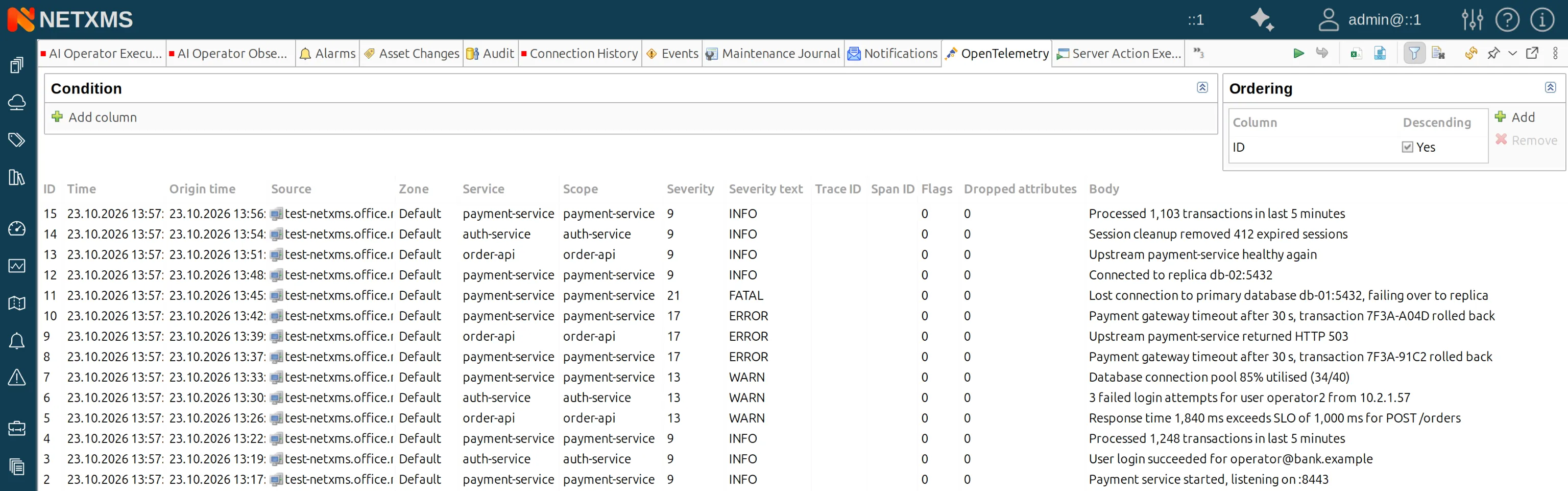
From there, the OpenTelemetry log parser decides which records matter: records that match its rules become NetXMS events, with OTLP severity mapped onto event severity, and enter the Event Processing Policy like any other signal.
It simply means that OTel logs get everything the event pipeline already does — correlation, suppression during maintenance windows, NXSL filters and enrichment, alarm generation with escalation and other things we all use and appreciate.
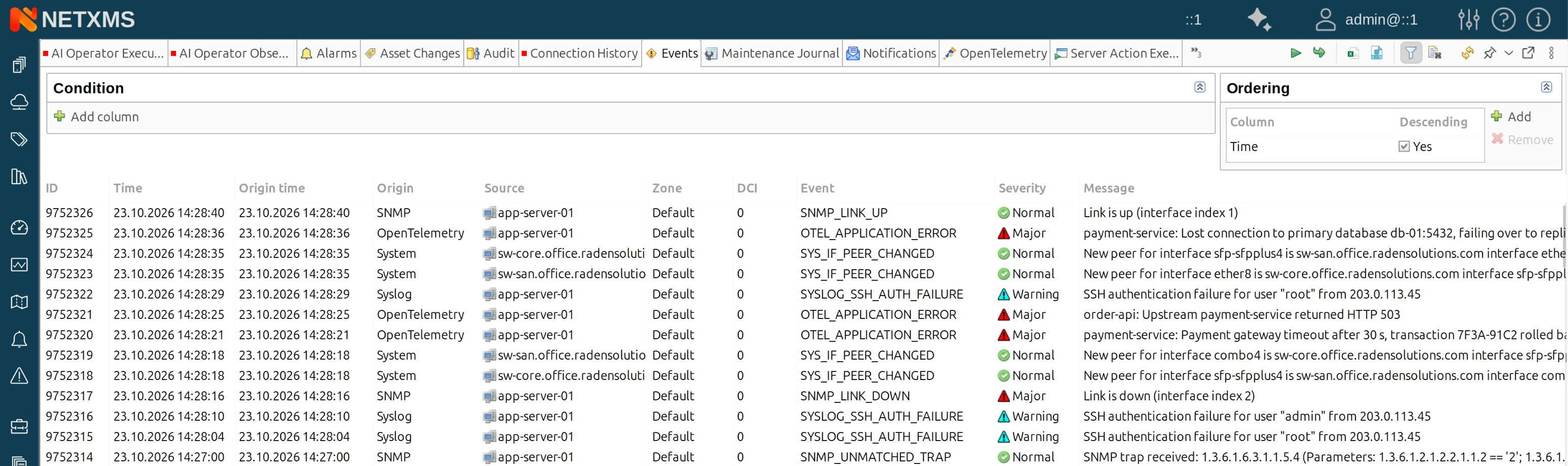
As a result, an error log from a containerised payment service and an SNMP trap from the switch underneath it land in the same policy engine, at the same time, on the same node object.
That’s a different proposition from a log store. NetXMS isn’t trying to be your full-text search over terabytes of application logs. It’s turning the log lines that matter operationally into actionable events next to your infrastructure signals.
OTLP severity numbers map onto NetXMS event severities according to a built-in table, there’s no configuration step.
Resource and log record attributes are exposed as event parameters, so NXSL has full access to them in filters, transformation scripts, and alarm keys.
You can route on service name, filter on a deployment environment attribute, or build an alarm key out of whatever dimensions matter to you. The log body itself isn’t exposed as a parameter yet — that’s landing in 6.2.4.
Filtering happens at ingest, not only in the Event Processing Policy. This works the same way syslog filtering does. You decide at the door which records are worth turning into events, rather than pushing every debug line from every instrumented service through the policy engine and discarding it at the other end. On a chatty application estate that difference is the difference between a usable event pipeline and a flooded one.
Picking metric names from a list, instead of typing them
Configuring OTLP metrics in 6.1 means knowing your metric names and attribute names exactly as they appear on the wire. That means either pulling them from your collector config or grepping server debug logs to see what’s actually arriving.
In 6.2, the server caches metric names and attributes seen per node. Instead of typing names by hand, you pick from a list of what that node has actually pushed. Same simplification for single-instance metrics and instance-discovery configurations.
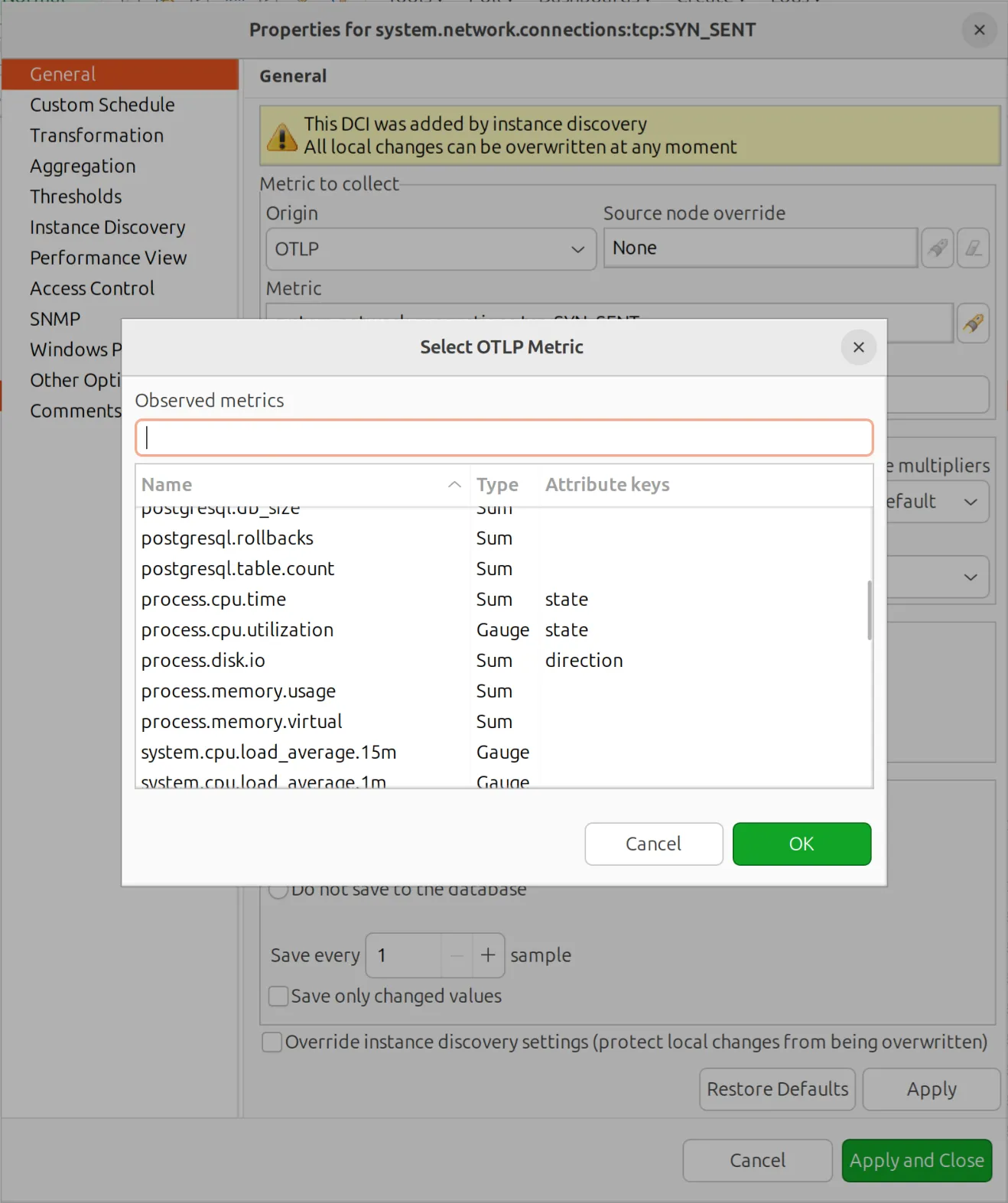
Small change, big impact on the day-to-day experience.
The other direction — NetXMS as an OTLP source
Ingestion is only half of it. NetXMS can also push its own telemetry out over OTLP — metrics and logs — to any OTLP-compatible backend.
This matters more than it might sound.
Most organisations running NetXMS aren’t starting from zero. There’s often an existing observability stack somewhere in the building: a Grafana estate, a vendor SaaS platform, a central SIEM, or a corporate collector that every team is required to feed.
And the team running it usually doesn’t want a second pane of glass — they want everything in theirs.
Exporting over OTLP means NetXMS doesn’t have to win that argument to be useful. It can be the system of record for the network, the servers, the ATMs, and the OT controllers (the things generic observability platforms monitor poorly or not at all) and still deliver a clean, standard-format feed upward to whatever the wider organisation has standardised on.
Some shapes this takes in practice:
- NetXMS as the infrastructure and OT collection layer, feeding an enterprise observability platform that has no meaningful SNMP, Modbus, or OPC UA story of its own
- NetXMS in the middle, ingesting OTel from application teams, correlating it against topology and infrastructure state, then exporting enriched events onward
- NetXMS at the edge, running on-premises in a site or plant, forwarding a filtered signal set to a central backend without shipping raw telemetry across the WAN
This sits alongside the export paths NetXMS already has — InfluxDB and ClickHouse for time-series, the Grafana datasource, the REST API, event forwarding to external systems.
OTLP is the vendor-neutral option that increasingly doesn’t need a custom integration on the receiving end.
Please note, there’s no gRPC support, so if your backend is configured to receive OTLP over gRPC you’ll need an HTTP receiver or a collector in front of it.
In NetXMS, event export is controlled by the Event Processing Policy. Forwarding to OTLP is an action you attach to a rule, which means the full filtering vocabulary you already use (we mean severity, source object, tags, time windows, NXSL conditions, etc.) decides what leaves the server. Thus, you can choose what critical infrastructure alarms to forward to a central backend, while keeping routine polling noise local.
Metric export is implemented as a fan-out driver, the same architecture behind the existing InfluxDB and ClickHouse integrations. Which DCIs get exported is controlled through custom attributes at node level.
So you can enable forwarding for a subset of the estate without touching the DCIs themselves. The pattern will already be familiar to anyone who has set up time-series export.
Once it’s in, it’s just a DCI
The point worth being explicit about is that OTLP metrics behave like any other NetXMS metric once configured. Things like thresholds, alarms or reporting — everything that already works for SNMP, agents, and push metrics works also for OTLP data.
The platform doesn’t treat OpenTelemetry as a separate class, it’s just another origin feeding the same engine.
Same story for logs on the event side. Once an OTLP log record becomes an event, nothing downstream knows or cares where it came from.
That matters because it means you don’t run two monitoring stacks. Your switches, your network devices, kiosks and ATMs, your OT controllers, and your OTel-instrumented services all live in the same place, with the same alerting logic and the same operator workflows.
Try it
OTLP metric support is available starting from NetXMS 6.1, with log ingestion in 6.2. Download it at netxms.com/downloads and the documentation will walk you through the module configuration, token issuance, and your first OTLP DCI.
If you want to talk through how OTel ingestion — or export — fits into your monitoring stack, get in touch with us at [email protected].