 NetXMS
 Oct 23, 2026
OpenTelemetry in NetXMS: Metrics, Logs, and Both Directions
How NetXMS ingests OpenTelemetry metrics and logs over OTLP, turns them into DCIs and events, and exports its own telemetry to any OTLP backend.
 NetXMS
 How NetXMS ingests OpenTelemetry metrics and logs over OTLP, turns them into DCIs and events, and exports its own telemetry to any OTLP backend.
NetXMS A three-month monitoring PoC met every signed success criterion and still proved almost nothing. Here are the failure modes to check yourself against before you accept a free pilot from any vendor.
NetXMS While PCI DSS 4.0 has a multitude of requirements that all ATMs must comply with, there's a crucial distinction that many organizations overlook: the monitoring system itself may not require PCI DSS certification when properly configured to handle only masked cardholder data.
NetXMS Monitoring network performance is only part of the puzzle. Organizations also need to know what they actually have. And that's where asset management comes in.
NetXMS Despite predictions of a cashless future, ATMs remain essential to how people access money.
NetXMS NetXMS 6 introduces AI-powered monitoring: an AI Assistant for interactive queries and an AI Agent for autonomous, scheduled infrastructure operations.
NetXMS A café network outage turns a coffee run into a real-world case study on why proactive monitoring matters. A story from the NetXMS development team.
NetXMS In this article we will focus on topology and network-related functionality, because that's what sets NetXMS apart from so many other monitoring solutions.
NetXMS How Austrian bicycle manufacturer KTM Fahrrad uses NetXMS for over 15 years to monitor production facilities, offices, and logistics centers.
NetXMS Remote access in NetXMS — secure VNC connections, screenshots, file uploads, and software package deployment to monitored devices from one platform.
NetXMS Step-by-step guide to configuring Grafana with NetXMS API for real-time network monitoring dashboards and infrastructure visualizations.
NetXMS How to configure NetXMS agent for remote file management and action execution — upload, download, and run commands on monitored nodes from the management console.
NetXMS In previous article we already touched on the new NetXMS 5 map-related functionality. Today we will dive into wireless network monitoring.
NetXMS In this article we’ll give a quick overview of the new map-related functionality in NetXMS version 5 — new major release. So, let’s go.
NetXMS How to customize and declutter the NetXMS UI — hide unused tabs, streamline object views, and tailor the workspace for a more efficient workflow.
NetXMS 85% of ATMs are vulnerable to attacks. Eight critical reasons banks must improve ATM monitoring to prevent data theft, downtime, and fraud losses.
NetXMS How Currenta uses NetXMS to monitor OT infrastructure across Europe’s largest chemical parks since 2014. Real-world practices from their monitoring team.
NetXMS NetXMS expands ATM monitoring presence in Ethiopia's banking sector, building on a strong track record with the region's financial institutions.
NetXMS With NetXMS ATM monitoring and management solution making a difference in many banks around the globe, we keep a close eye on the major trends on the ATM market. And we’d like to share them with you.
NetXMS What are table metrics in NetXMS, how they differ from single-value metrics, and a step-by-step guide to configuring them for your monitoring.
NetXMS Interview with a long-time NetXMS user managing 400+ network devices and 50 servers — on his monitoring journey and what he wants from an ideal NMS.
NetXMS Learn how network analytics helps SRE teams identify issues, optimize resources, and make data-driven decisions for better network management and uptime.
NetXMS How context dashboards in NetXMS dynamically display data for the selected node — replacing static, per-device dashboards with reusable templates.
NetXMS How South African agricultural co-operative SSK uses NetXMS to monitor hundreds of devices — from servers and routers to refrigerators storing medicine.
NetXMS Why Telecoms, ISPs, and MSPs choose NetXMS for network monitoring — and how it helps them deliver higher-value services to their customers.
NetXMS How NetXMS monitors thousands of ATMs worldwide — secure, full visibility, remote management, ticketing integration, and smart alerting in one platform.
NetXMS A deep dive into the new NetXMS GUI — designed for SRE teams who want powerful graphical tools without giving up command-line efficiency.
NetXMS How NetXMS log monitoring helps you detect critical events fast, parse log files automatically, and turn log data into actionable alerts.
NetXMS How NetXMS remote management lets you access files, execute commands, and manage devices directly from the monitoring console — no extra tools.
NetXMS How NetXMS uses the MQTT protocol to monitor and manage IoT devices — from smart sensors to industrial equipment — alongside SNMP.
NetXMS How NetXMS provides native monitoring for MikroTik routers and switches — full SNMP compatibility, auto-discovery, and device templates.
NetXMS NetXMS 4.0 introduces a completely reworked Business Services tool for SLA compliance monitoring with powerful new functionality and flexibility.
NetXMS How NetXMS monitors diverse agricultural equipment — from fridges and solar panels to power generators — across dispersed, unreliable network regions.
NetXMS More efficient monitoring of diverse and scattered networks, effective security and improved data management with the customer — this is how NetXMS can help Managed Service Providers (MSPs) offer a higher-value service to their clients.
NetXMS Many hardware vendors are looking for an EMS (Element Management System) solution. An EMS solution helps sell additional services to customers and provides extra value for existing hardware offers.
NetXMS How NetXMS collects and exports SNMP data from 12,000+ network devices worldwide using proxy agents, zoning, and a specialized time-series database.
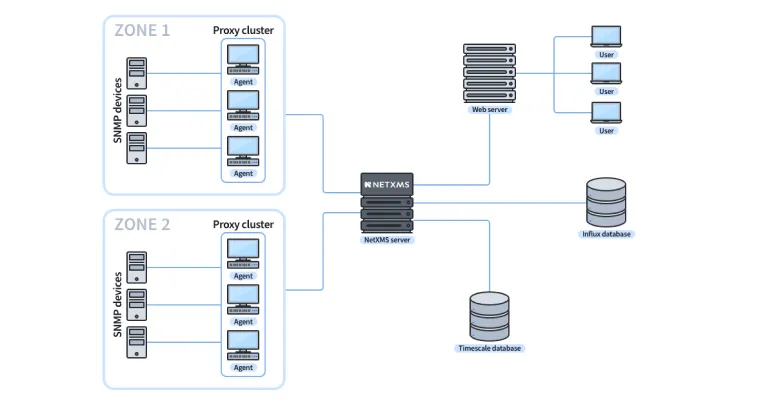 NetXMS
 How NetXMS discovers full industrial inventory using EthernetIP and MODBUS-TCP — beyond what standard SNMP tools find on complex production lines.
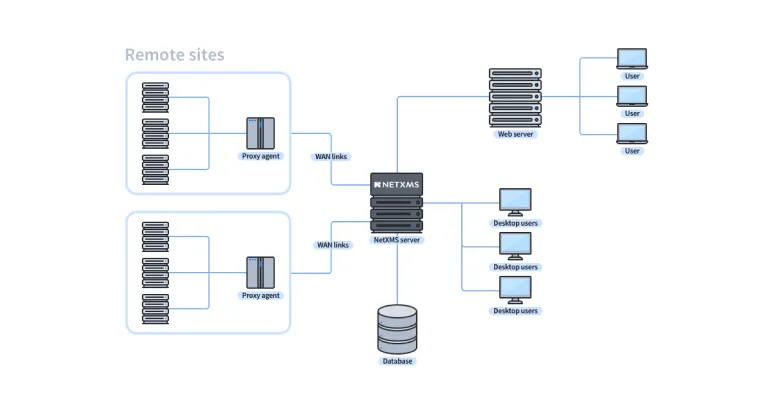
NetXMS How NetXMS proxy agents and zoning keep monitoring data intact across unstable networks in mining, oil, agriculture, shipping, and other remote industries.
Allow us to check in with the most relevant information — the latest announcements, release notes, and news.